
ShopNav
Personal Project - App Design - June 2025
Challenge: Supermarkets often have a lot of product content, with endless aisles, shelves, and brands to choose from. For busy individuals, grocery shopping can take up a lot of time, especially when you start comparing prices, sales, size, and more.
Solution: To help shoppers save time and money, I chose to design an app for a grocery stores that helps shoppers locate products as they shop in person. Additionally, they can plan ahead by making shopping lists, for easy access when they shop later on.
My Role: I utilized by fundamental skills learned from the Coursera Google UX Design course to prototype an app that allows shoppers to efficiently find their desired products, without having to loop through aisles repeatedly.
Beginning steps
Began with market research, conducted a competitive audit to understand what other grocery shopping apps offer, what works, and what doesn't.
Getting to know the user
Next, I created some user personas to understand potential users better. I focused on a wide range of users, with different needs, to make this product accessible and functional.

If these were possible customers, what should the design have to satisfy their needs?


Additionally, I made user journey maps for each persona, to understand and empathize with the user more, and the emotions they may experience throughout the flow of their grocery shopping experince


Ideation process
First, I defined a goal statement and value proposition list to come back to throughout my prototyping phase
Goal statement:
Our grocery app will let users navigate grocery stores with ease which will affect users who are short on time and money by helping them to find their desired products time efficiently and highlighting grocery deals. We will measure effectiveness by timing users and getting feedback.
Value proposition list:
-
Easy to use app design, adjustable text, and feature to order and deliver groceries ahead of time for older individuals who are less mobile
-
Grocery finder, to navigate given items in a grocery store to save time for busy parents
Then, I created story boards and outlined user flows to understand the product functionality and intended user-product interactions
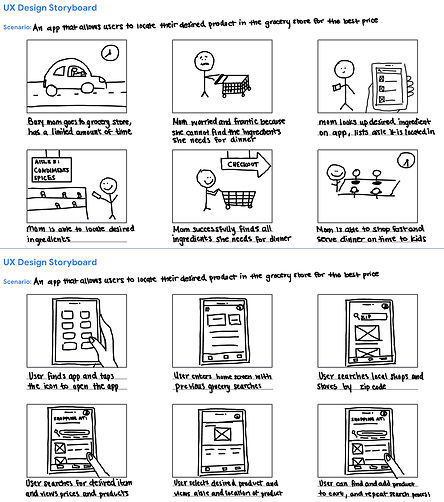

These sketches helped me visualize the user experience and understand how the product will be used.
Next, I sketched out wireframes, and transformed them into low fidelity prototypes in figma.
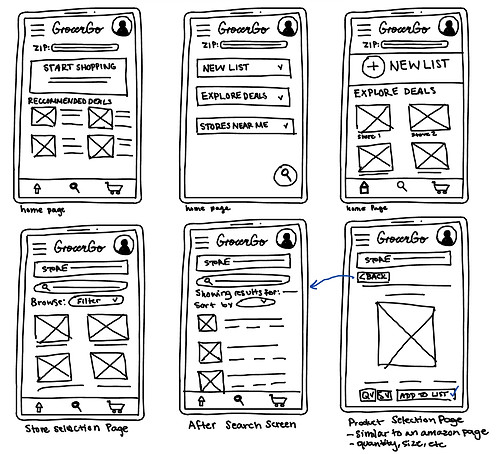

The final prototype, and next steps
I transformed my lo fi prototypes to hi fi prototypes, focusing mainly on the navigation feature of the app, to help people find their desired products faster and more efficiently.

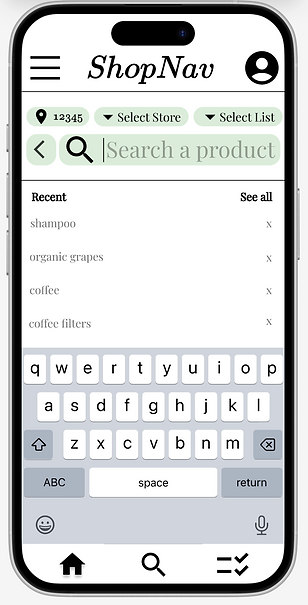


Due to the short timeline of this project, this is where I ended off. The next steps below continue my vision of ShopNav.
-
User research
-
Usability testing interview
-
Adding list feature
-
Finalizing design
Constraints: no user testing, short timeframe